Always run Chrome/Chromium with the sandbox
Running Chrome/Chromium without the sandbox enabled is a security catastrophe.
Always use the sandbox
Never ever run Chrome/Chromium without the sandbox enabled. And once again to make it clear: never ever run Chrome/Chromium without the sandbox enabled.
A lot of code examples for Puppeteer you find on the Internet look like this:
const browser = await puppeteer.launch({
    headless: true,
    args: [
        "--no-sandbox",
        "--disable-setuid-sandbox",
        // ... more options
    ],
});
And AI coding agents can also generate code snippets like that.
That is a security catastrophe! If you run Puppeteer against untrusted pages, you are exposing the browser to hostile input on your own infrastructure, including RCE (remote code execution) vulnerabilities.
Literally, an attacker can find ways to execute any code and obtain any data or environment variables from the runtime environment where the browser is running.
I think many teams still treat headless Chrome/Chromium as if it were just a rendering engine. It is not. It is one of the most exposed and complicated parts of the system. If your service opens attacker-controlled pages, then Chrome/Chromium is part of your security perimeter.
Developers often choose to run browsers without the sandbox because it is easier to run them in Docker. However, I want to share that this is not the case, and it requires a bit more work from you, but all that work is worth the effort.
The threat model
A typical browser automation service does something simple:
- Accepts a URL or raw HTML.
- Opens it in Chrome/Chromium via Puppeteer.
- Waits for it to load.
- Takes a screenshot, PDF, or extracts data.
From a product point of view, that sounds harmless.
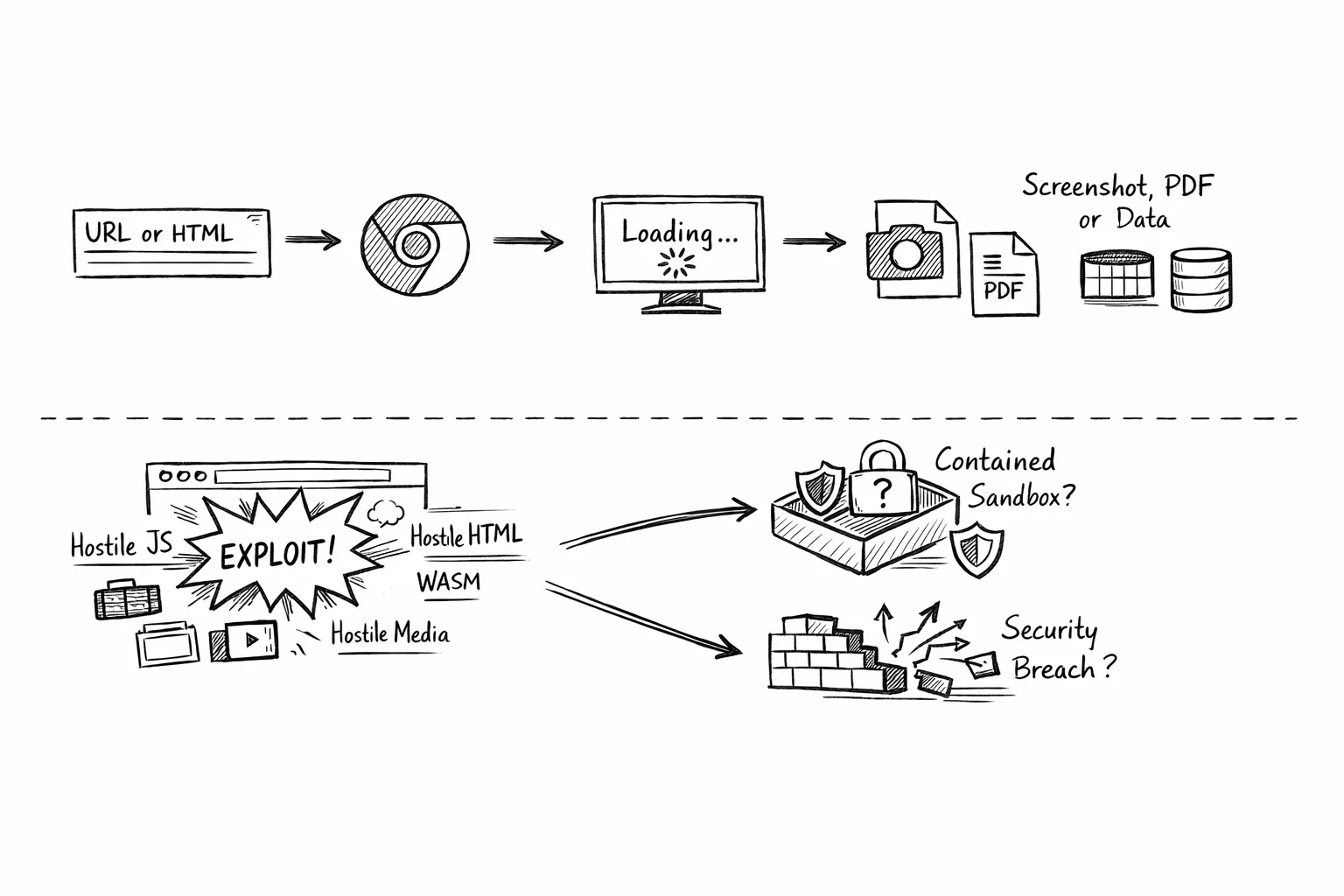
From a security point of view, it means I am willingly asking my server to load hostile JavaScript, hostile HTML, hostile WebAssembly, hostile media, hostile frames, and everything else modern websites can throw at a browser.
What does happen after the browser is compromised? Does Chrome/Chromium contain the exploit the way it was designed to? Or did you quietly remove the exact protections that were supposed to save you?
The worst security mistake
Chrome/Chromium fails to start in containers with the sandbox. Someone finds a workaround. The workaround works. The team moves on.
I mentioned it above, but I will repeat it again.
The single most dangerous mistake in a Puppeteer deployment is treating these flags as normal:
--no-sandbox--disable-setuid-sandbox
I would not ship them in production for a service that renders untrusted pages.
The Chrome/Chromium sandbox is not some optional hardening extra. It is one of the main reasons a renderer compromise does not immediately become a system compromise.
The practical difference is straightforward:
- With the sandbox enabled, a browser exploit usually still needs another step to escape into the container or host.
- With
--no-sandbox, the attacker is much closer to native code execution in your backend environment.
That is the difference between “the browser got compromised” and “my worker got owned”.
Runtime must be fixed
This is the principle I came away with:
If Chrome/Chromium cannot start sandboxed in the environment, I should fix the environment. I should not disable the sandbox and call it done. That usually means the problem is somewhere in the runtime:
- user namespaces;
- seccomp;
- container capabilities;
- AppArmor;
- Kubernetes settings;
- Docker host configuration.
Not in Chrome/Chromium.
Remote code execution vulnerabilities
Let me share just a tiny list of vulnerability reports that were discovered in the past few years:
- CVE-2019-5782: Incorrect optimization assumptions in V8 in Google Chrome prior to 72.0.3626.81 allowed a remote attacker to execute arbitrary code inside a sandbox via a crafted HTML page.
- CVE-2019-5786: Object lifetime issue in Blink in Google Chrome prior to 72.0.3626.121 allowed a remote attacker to potentially perform out of bounds memory access via a crafted HTML page.
- CVE-2021-21224: Type confusion in V8 in Google Chrome prior to 90.0.4430.85 allowed a remote attacker to execute arbitrary code inside a sandbox via a crafted HTML page.
- CVE-2026-4678: Use after free in WebGPU in Google Chrome prior to 146.0.7680.165 allowed a remote attacker to execute arbitrary code inside a sandbox via a crafted HTML page.
- CVE-2025-4609: Incorrect handle provided in unspecified circumstances in Mojo in Google Chrome on Windows prior to 136.0.7103.113 allowed a remote attacker to potentially perform a sandbox escape via a malicious file.
And pay attention to the last one.
Always keep the browser up to date
There is another mistake that shows up right after teams re-enable the sandbox: they assume the problem is solved.
If the Chrome/Chromium build itself is vulnerable, then the browser may still be exploitable with the sandbox on. The sandbox changes the blast radius. It does not magically patch the browser bug.
As I mentioned above, on August 11, 2025, a critical Chrome/Chromium bug (CVE-2025-4609) was disclosed: a sandbox escape that can lead to remote code execution (RCE).
Using Chrome/Chromium with the sandbox wasn’t enough!
Browser versioning has to be explicit
I have become increasingly skeptical of browser versioning by accident.
What I mean by that:
- Chrome comes from a base image
- the base image uses
latest - Puppeteer is pinned somewhere else
- nobody is fully sure which browser is actually in production
That setup is fragile operationally and dangerous from a security perspective.
What I want instead is very boring:
- an explicit browser version in the image
- an explicit Puppeteer version in the app
- a deliberate decision that those versions belong together
If Chrome is security-critical, then I do not want it hiding in the background as inherited image state.
I want to own it in the Dockerfile.
Patching your browser and constantly updating them to the recent versions is a must.
Do not disable site isolation
Another thing I see people disable too casually is site isolation:
IsolateOriginssite-per-process
To be precise, these are not the same thing as --no-sandbox. Disabling them does not by itself mean “remote page gets shell”.
But I still would not keep them disabled by default in a production browser worker that opens attacker-controlled content.
Why?
Because site isolation is part of Chrome/Chromium blast-radius reduction story.
When it is enabled, different sites are more strongly separated. When it is disabled, a compromised renderer can end up with a broader in-browser reach, more useful memory layout, and more damage potential across origins.
So my view is simple:
--no-sandboxis the catastrophic mistake- disabling site isolation is the unnecessary mistake
One is worse. Both are bad.
Use incognito mode
I also like using Chrome/Chromium incognito contexts for browser workers whenever possible.
It is not a replacement for the sandbox, patching, or container isolation. But it is still a useful security measure because it reduces how much state can leak between jobs.
Using incognito mode helps by:
- isolating cookies, storage, cache, and other session state per job;
- reducing accidental cross-request data leakage;
- making browser workers more disposable and easier to reason about;
- lowering the chance that one malicious or broken page leaves behind state that affects the next one.
I treat incognito mode as a containment and hygiene feature, not as an exploit mitigation. It will not stop a browser vulnerability, but it does reduce persistence and cross-job contamination, which still matters a lot in multi-tenant rendering systems.
Configure Docker runtime
If I am running Chrome/Chromium inside Docker, I want the container runtime to support Chrome’s sandbox instead of forcing Chrome/Chromium into an unsandboxed mode.
The first thing I check is the host, not the application:
kernel.unprivileged_userns_cloneshould be enabled if I want Chrome to use unprivileged user namespacesuser.max_user_namespacesshould be non-zero and reasonably large- the Docker host should not have an AppArmor or seccomp policy that blocks the namespace operations Chrome/Chromium needs.
Then I verify the actual Chrome/Chromium startup path inside a container, not just the application process.
A practical Docker smoke test looks like this:
docker run --rm --shm-size=2g \
  --security-opt seccomp=/etc/docker/seccomp/chrome.json \
  --entrypoint /bin/bash my-image \
  -lc 'tmp=$(mktemp -d); google-chrome-stable --headless=new --disable-gpu --no-first-run --no-default-browser-check --user-data-
dir="$tmp" --dump-dom about:blank 2>/dev/null; code=$?; rm -rf "$tmp"; exit $code'
If that command exits successfully, it tells me the runtime is at least capable of launching sandboxed Chrome. It does not prove the full service is correct, but it is the right starting point.
For Docker, the most common problem I have seen is the default seccomp profile blocking namespace-related syscalls. In that case, the clean fix is usually:
- keep —no-sandbox out of the launch flags;
- keep SYS_ADMIN out of the container if possible;
- provide a custom seccomp profile that allows the Chrome/Chromium sandbox path to work.
Check out the following seccomp profile.
That does not mean “allow everything”. It means reviewing the default seccomp profile and making a narrow exception for the namespace behavior Chrome/Chromium needs.
A minimal Docker service configuration often needs:
- enough shared memory, for example —shm-size=2g;
- a security-opt entry pointing at the custom seccomp profile;
- no —cap-add SYS_ADMIN;
- no —no-sandbox
And I always test the real application launch after the smoke test, because the application may still pass a bad flag like —no-zygote and break sandboxed startup even when the container runtime itself is fine.
Configure Kubernetes
Kubernetes adds another layer of complexity because there are two questions instead of one:
- can the cluster runtime support Chrome/Chromium sandbox?
- did my Pod spec actually preserve the settings I thought I applied?
For Kubernetes, I start with a small user-namespace smoke test before I assume anything:
apiVersion: v1
kind: Pod
metadata:
    name: userns-smoke-test
spec:
    hostUsers: false
    restartPolicy: Never
    containers:
        - name: test
          image: busybox:1.36
          command: ["sh", "-c", "id && sleep 30"]
          securityContext:
              allowPrivilegeEscalation: false
              seccompProfile:
                  type: RuntimeDefault
If the cluster accepts the Pod and starts it, that is a good signal. But I still verify the live Deployment and the live Pod afterward, because managed clusters can behave differently than I expect, and fields may not always survive to the running workload in the way I assume.
For a Chrome worker Pod, my baseline settings are usually:
- allowPrivilegeEscalation: false;
- seccompProfile: RuntimeDefault or a stricter approved profile;
- no added Linux capabilities unless I have a very specific reason;
- a non-root runtime user;
- no service account token if the worker does not need Kubernetes API access.
If the cluster supports user namespaces properly, I also want:
- hostUsers: false;
That said, I do not blindly assume that one field solves the problem. I verify the live Pod spec and then inspect the actual Chrome processes in the container.
What I want to confirm in the running Pod is:
- no —no-sandbox;
- no —disable-setuid-sandbox;
- no —no-zygote;
- renderer processes showing sandbox-related restrictions such as seccomp and NoNewPrivs.
I also try not to rely on SYS_ADMIN in Kubernetes unless I am boxed into it operationally and have consciously accepted the tradeoff. If I can get Chrome working with user namespaces and seccomp instead, that is where I want to end up.
And just like with Docker, a Kubernetes smoke test is not enough. I want a second test that launches Chrome exactly the way the service launches it, because a runtime that can boot about:blank is not automatically a runtime that can boot my full browser worker safely.
Avoid SYS_ADMIN
One of the most tempting shortcuts in containerized Chrome setups is giving the container SYS_ADMIN. It often makes things work.
docker run --cap-add=SYS_ADMIN ...
I still do not like it. SYS_ADMIN is broad. Too broad. If I can avoid it, I will.
What I prefer instead is:
- keep Chrome/Chromium sandboxed;
- avoid
SYS_ADMIN; - make the runtime support the sandbox properly.
In practice, that can mean:
- user namespaces where available;
- a seccomp profile that allows the namespace syscalls Chrome/Chromium actually needs;
- validating the host and cluster behavior instead of assuming it.
This is slower than the shortcut, but it is the right tradeoff for a service that renders hostile pages all day.
Running as a non-root user is not enough
I am strongly in favor of running the browser as a non-root user. That should absolutely be the default.
But I do not think it is enough to declare victory.
If an exploit can still execute arbitrary commands in the container as that non-root user, the worker is still compromised.
And a compromised browser worker can still do a lot:
- read secrets available to the process;
- exfiltrate rendered content;
- call internal services;
- abuse network access;
- persist within the lifespan of the worker;
- attack adjacent systems.
So the question I care about is not only:
“Did I avoid root?”
It is:
“Did I keep attacker-controlled browser execution inside the browser boundary?”
That is the bar.
Checklist
If I were setting up or reviewing a Puppeteer service that renders untrusted pages, this is the baseline I would want:
- patched Chrome or Chromium;
- Puppeteer aligned with the browser version in use;
- no
--no-sandbox; - no
--disable-setuid-sandbox; - no other flags that undermine sandboxed startup;
- site isolation left enabled;
- explicit browser installation and version pinning in the application image;
- a non-root runtime user;
- no unnecessary Linux capabilities;
allowPrivilegeEscalation: falsewhere compatible;- restrictive seccomp and AppArmor policies;
- restricted egress for browser workers;
- short-lived and isolated browser workers where practical
If the environment supports stronger isolation, I would also consider:
- gVisor;
- microVM-style isolation;
- stronger worker segregation by trust level.
None of this replaces patching Chrome or Chromium.
These controls reduce the blast radius when something still goes wrong.
Just as important, this is what I would avoid:
- shipping
--no-sandboxto production; - keeping
--disable-setuid-sandboxjust because it once fixed startup; - disabling site isolation globally as a default compatibility setting;
- letting the browser version drift invisibly through a base image;
- assuming Docker or Kubernetes preserve Chrome’s security model by default;
- treating “the page rendered” as proof that the deployment is secure.
A successful render is not a security signal. It only proves that the browser launched.